How to share a Claude artifact privately
Claude's own Publish makes an artifact public to anyone with the link on the Free, Pro and Max plans; on Team and Enterprise it stays inside your organization. To share with only the people you choose, publish to a private link instead: add the rtfx.pro MCP server to Claude once, then ask Claude to publish and share from chat.
Four steps to a private link
-
Step 1. Add rtfx to Claude
In Claude, open Customize → Connectors, click + Add, then Add custom connector, and use the URL
https://mcp.rtfx.pro/mcp. Sign in with the code we email you; there is nothing to paste. Added on the web or in Claude Desktop, it works on mobile too. In Claude Code, runclaude mcp add --transport http rtfx https://mcp.rtfx.pro/mcp.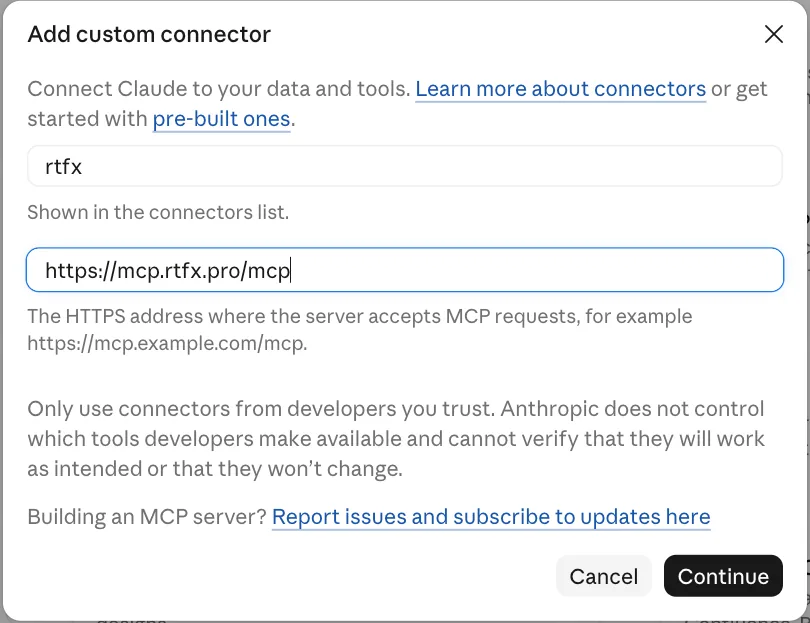
-
Step 2. Ask Claude to publish it
Say publish it with rtfx as a private link. Claude replies with your link, and only you can open it until you share it. Publish again to the same name and the same link shows the new version; you can roll back from chat.
-
Step 3. Share it with the people you choose
Ask Claude:
Share it with dana@acme.com.
You can add viewers, editors, or everyone in your workspace. For someone without an account, open the artifact's Share page on rtfx.pro and create a named share link for them, with an optional expiry that you can extend or revoke any time.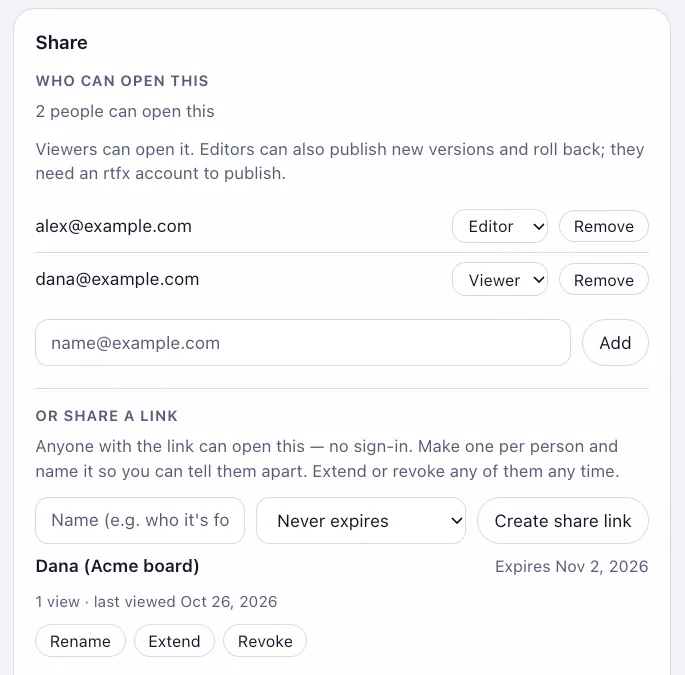
-
Step 4. See who opened it
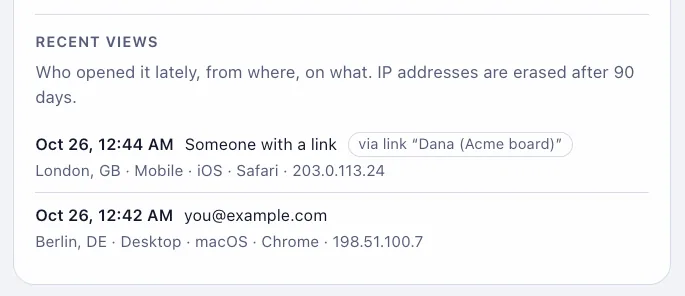
Ask Claude who has opened it, or look at the view log on the Share page: who opened it, when, and on what device.
Questions
Can anyone with the link open an artifact I publish with Claude?
On the Free, Pro and Max plans, yes: Claude's own Publish makes the artifact public to anyone with the link. On Team and Enterprise, sharing stays inside your organization and viewers must be logged in to it.
Do the people I share with need an account?
People you add by email sign in with a one-time code we email them. For someone without an account, create a named share link on the artifact's Share page: they open the page with no sign-in, and you can set an expiry or revoke the link at any time.
What does it cost?
There is a Free plan. Pro is $12/mo and Team is $40/mo, for more artifacts, storage and people. rtfx staff (operators) see metadata only, never artifact content.